

Minimalist Design in UX/UI: Balancing Simplicity with Functionality
Minimalist design in UX/UI is an approach that emphasizes simplicity by focusing on essential elements while maintaining usability and functionality. The goal is to reduce visual clutter without making interfaces harder to use.
4 minutes
Nov 12, 2024
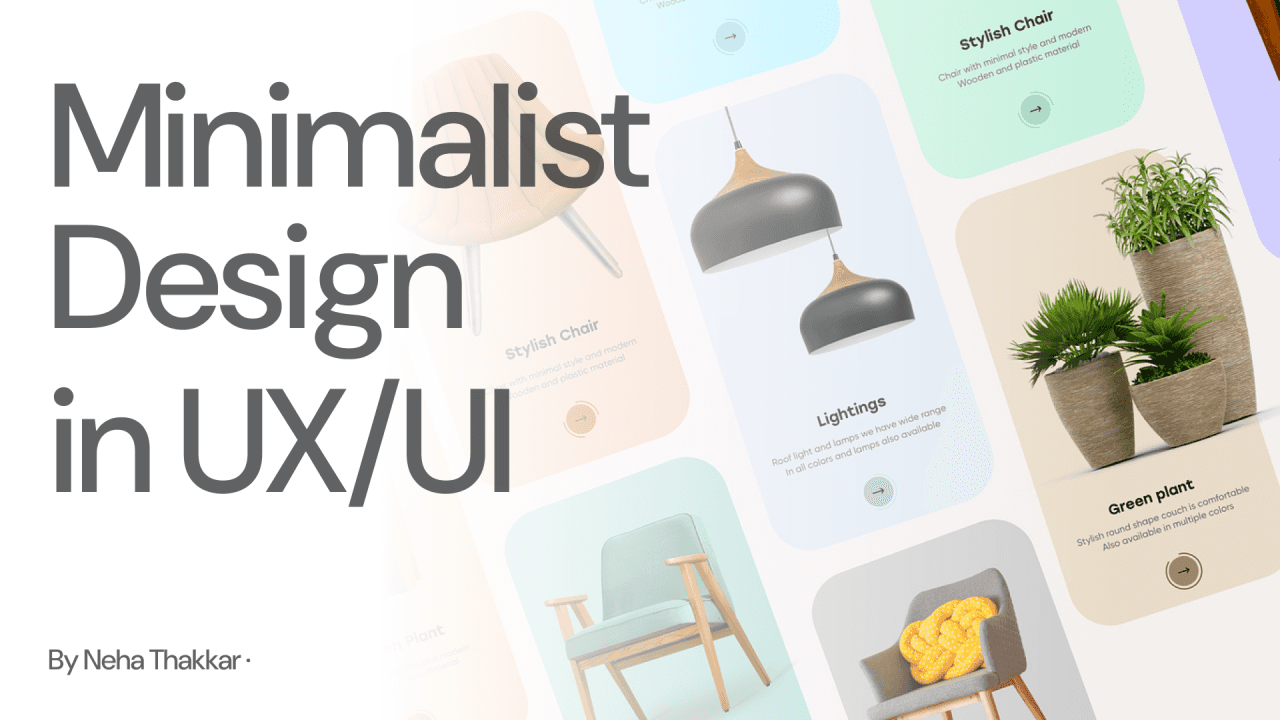
Minimalist design in UX/UI focuses on creating simple, clear interfaces that help users achieve their goals without distraction. Instead of removing elements for the sake of aesthetics, good minimalist design prioritizes what users actually need and removes everything else. In user experience and interface design, simplicity must still support functionality, clarity, and ease of use. When done well, minimalist UX/UI design reduces cognitive load, improves usability, and makes products feel more intuitive rather than stripped down. Today’s minimalism combines functional clarity with subtle motion, refined typography, and meaningful micro-interactions to create immersive yet effortless experiences, prioritizing usability, accessibility, and performance while reducing cognitive load.
What Is Minimalist Design in UX/UI?
Minimalist design in UX/UI is about designing interfaces with only the most necessary elements, ensuring users can complete tasks easily without unnecessary distractions. It balances visual simplicity with functional clarity.
Due to its unspoken maxim that "less is more" and ability to draw attention to important design aspects and direction, minimalism has dominated the UX/UI design scene for the past 10 years along with other design trends.
Its appeal originates from the notion that removing superfluous and superfluous items from the interface can make it easier and more enjoyable for users to focus on key functionality. However, as technology advances, so do user needs, and this is also true with minimalist design.
The next generation of UX/UI design, which emphasises striking a balance between the fundamentals of minimalism and essential usability features, will be greatly influenced by the new elements of trends like personalisation and immersive technology.
Minimalist Design vs Overdesigned Interfaces
Aspect | Minimalist UX/UI | Overdesigned UX/UI |
|---|---|---|
Visual elements | Only essential elements | Excessive visuals & content |
Cognitive load | Low | High |
Usability | Clear and focused | Often confusing |
User focus | Task-oriented | Feature-heavy |
Minimalism's Origins and Enduring Appeal
A 2018 study by the Nielsen Norman Group found that minimalist designs tend to enhance usability by reducing cognitive load, allowing users to focus on essential elements such as content and primary actions.
Minimalist design:
Inspired by Bauhaus principles : Balanced asymmetry, Industrial materials, Clean lines, and Primary colors.
Popularised by digital giants like Apple, Material design etc.
Focuses on clarity and simplicity
Eliminates excess, leaving only essential elements.
According to data from Google’s Search Quality Evaluator Guidelines, users spend about 53% of their time above the fold (the top portion of the page), thus the most critical information must be accessible and visually clear.
Relevance in the digital age:
User demands faster, cleaner interfaces.
Minimalism enhances usability by reducing cognitive leads
Allows users to focus on content and primary actions.
Role of Personalisation in Minimalist Design
Digital interactions are increasingly requiring personalisation, and minimalist design is changing to meet this need without compromising its essential ideas. Hyper-personalised information that adjusts to user choices without overcrowding the interface is now possible thanks to sophisticated algorithms and machine learning.
To prevent users from being overloaded with information, Amazon's recommendation system, for example, discreetly incorporates personalised ideas within a simple structure.
According to HubSpot research, users are 2.6 times more likely to favour personalised information than non-personalised encounters. This is in line with minimalist design's future, which emphasises simplicity and content relevance.
The next step in the evolution of simplicity is a minimalist interface that adjusts to the user by analysing usage patterns.
Balancing Accessibility and Minimalism
One of the biggest challenges for minimalist design is ensuring that simplicity does not come at the cost of accessibility. A minimalist interface may look sleek, but if key functionalities like text size, color contrast, or navigation aren’t optimized for accessibility, it can alienate a significant portion of the audience.
Accessibility is a legal and ethical obligation for designers, with global standards such as the Web Content Accessibility Guidelines (WCAG) enforcing compliance. Studies show that over 15% of the world's population lives with some form of disability, making accessible design critical.
Future minimalist design will focus on inclusive minimalism, where simple interfaces also meet accessibility standards. Google, for example, has been a pioneer in this space, introducing features like dark mode and adaptive contrast to cater to users with visual impairments while retaining minimalist aesthetics.
Examples of Minimalist Design in UX/UI
A minimalist interface uses clear typography, sufficient spacing, and limited colors to guide attention.
Buttons are easy to find, content is prioritized, and interactions feel intentional rather than decorative.
Minimalist design does not mean fewer features, it means presenting features in a way that feels calm and understandable.
Why Minimalist Design Matters in UX/UI
Minimalist design improves usability by reducing cognitive overload and helping users focus on what matters most. When interfaces are simple and intentional, users make decisions faster and feel more confident using the product.
Evolving to meet the demands of modern users. The future of minimalist design in UX/UI will focus on balancing simplicity with functionality, ensuring that interfaces are not only clean but also intuitive, accessible, personalised, and immersive.
Designers who can master this balance will create interfaces that stand the test of time, offering users seamless, engaging, and efficient experiences.
Explore More Reads


Minimalist Design in UX/UI: Balancing Simplicity with Functionality
Minimalist design in UX/UI is an approach that emphasizes simplicity by focusing on essential elements while maintaining usability and functionality. The goal is to reduce visual clutter without making interfaces harder to use.
4 minutes
Nov 12, 2024
Minimalist design in UX/UI focuses on creating simple, clear interfaces that help users achieve their goals without distraction. Instead of removing elements for the sake of aesthetics, good minimalist design prioritizes what users actually need and removes everything else. In user experience and interface design, simplicity must still support functionality, clarity, and ease of use. When done well, minimalist UX/UI design reduces cognitive load, improves usability, and makes products feel more intuitive rather than stripped down. Today’s minimalism combines functional clarity with subtle motion, refined typography, and meaningful micro-interactions to create immersive yet effortless experiences, prioritizing usability, accessibility, and performance while reducing cognitive load.
What Is Minimalist Design in UX/UI?
Minimalist design in UX/UI is about designing interfaces with only the most necessary elements, ensuring users can complete tasks easily without unnecessary distractions. It balances visual simplicity with functional clarity.
Due to its unspoken maxim that "less is more" and ability to draw attention to important design aspects and direction, minimalism has dominated the UX/UI design scene for the past 10 years along with other design trends.
Its appeal originates from the notion that removing superfluous and superfluous items from the interface can make it easier and more enjoyable for users to focus on key functionality. However, as technology advances, so do user needs, and this is also true with minimalist design.
The next generation of UX/UI design, which emphasises striking a balance between the fundamentals of minimalism and essential usability features, will be greatly influenced by the new elements of trends like personalisation and immersive technology.
Minimalist Design vs Overdesigned Interfaces
Aspect | Minimalist UX/UI | Overdesigned UX/UI |
|---|---|---|
Visual elements | Only essential elements | Excessive visuals & content |
Cognitive load | Low | High |
Usability | Clear and focused | Often confusing |
User focus | Task-oriented | Feature-heavy |
Minimalism's Origins and Enduring Appeal
A 2018 study by the Nielsen Norman Group found that minimalist designs tend to enhance usability by reducing cognitive load, allowing users to focus on essential elements such as content and primary actions.
Minimalist design:
Inspired by Bauhaus principles : Balanced asymmetry, Industrial materials, Clean lines, and Primary colors.
Popularised by digital giants like Apple, Material design etc.
Focuses on clarity and simplicity
Eliminates excess, leaving only essential elements.
According to data from Google’s Search Quality Evaluator Guidelines, users spend about 53% of their time above the fold (the top portion of the page), thus the most critical information must be accessible and visually clear.
Relevance in the digital age:
User demands faster, cleaner interfaces.
Minimalism enhances usability by reducing cognitive leads
Allows users to focus on content and primary actions.
Role of Personalisation in Minimalist Design
Digital interactions are increasingly requiring personalisation, and minimalist design is changing to meet this need without compromising its essential ideas. Hyper-personalised information that adjusts to user choices without overcrowding the interface is now possible thanks to sophisticated algorithms and machine learning.
To prevent users from being overloaded with information, Amazon's recommendation system, for example, discreetly incorporates personalised ideas within a simple structure.
According to HubSpot research, users are 2.6 times more likely to favour personalised information than non-personalised encounters. This is in line with minimalist design's future, which emphasises simplicity and content relevance.
The next step in the evolution of simplicity is a minimalist interface that adjusts to the user by analysing usage patterns.
Balancing Accessibility and Minimalism
One of the biggest challenges for minimalist design is ensuring that simplicity does not come at the cost of accessibility. A minimalist interface may look sleek, but if key functionalities like text size, color contrast, or navigation aren’t optimized for accessibility, it can alienate a significant portion of the audience.
Accessibility is a legal and ethical obligation for designers, with global standards such as the Web Content Accessibility Guidelines (WCAG) enforcing compliance. Studies show that over 15% of the world's population lives with some form of disability, making accessible design critical.
Future minimalist design will focus on inclusive minimalism, where simple interfaces also meet accessibility standards. Google, for example, has been a pioneer in this space, introducing features like dark mode and adaptive contrast to cater to users with visual impairments while retaining minimalist aesthetics.
Examples of Minimalist Design in UX/UI
A minimalist interface uses clear typography, sufficient spacing, and limited colors to guide attention.
Buttons are easy to find, content is prioritized, and interactions feel intentional rather than decorative.
Minimalist design does not mean fewer features, it means presenting features in a way that feels calm and understandable.
Why Minimalist Design Matters in UX/UI
Minimalist design improves usability by reducing cognitive overload and helping users focus on what matters most. When interfaces are simple and intentional, users make decisions faster and feel more confident using the product.
Evolving to meet the demands of modern users. The future of minimalist design in UX/UI will focus on balancing simplicity with functionality, ensuring that interfaces are not only clean but also intuitive, accessible, personalised, and immersive.
Designers who can master this balance will create interfaces that stand the test of time, offering users seamless, engaging, and efficient experiences.